SEO: A Guide for Churches
You've heard people toss around "SEO" all the time. It sounds important, but also confusing. Here's a plain-language guide to what SEO is and how your church can start using it today.
Imagine someone is looking for a new church. What do you think they do first?
More often than not, they search online for something like "churches near me" or "church [your city]." And when they do, does your church show up? If it does, where does it rank?
Most people visit a church's website before they ever attend a service in person. That's why it's critical to have a website that's not only compelling, but easy to find in search results.
That leads us to SEO. You've probably heard the term before, but what does it actually mean?
What is SEO?
Search engines like Google use an algorithm to decide which web pages show up for a search, and in what order. The algorithm "reads" websites and tries to show the most relevant, trustworthy results for each person.
SEO (search engine optimization) is the set of practices that help your web pages rank better in those results. In other words, you're doing everything you can to help Google understand your website and see it as a great answer for the people you want to reach.
Why does SEO matter for churches?
Most people turn to the internet first when they're looking for a church. They rarely just show up on a Sunday. Instead, they search, find a few churches, and look at each website to decide if it's a community they could belong to.
SEO increases your church's visibility when someone nearby is searching. It's your opportunity to introduce your church to people who are already looking and invite them in. If you're not paying attention to it, your church probably isn't showing up at all.

Local SEO
Local SEO is about showing up when people in your area search for a church. The goal is to land in the map results at the top of Google, not buried on page two.
Here are the three biggest things you can do:
1. Set up your Google Business Profile. Google Business Profile is a free tool for managing how your church appears on Google Search and Maps. Claim your profile and fill out everything: address, phone number, website, service times, photos and a short description.
2. Get listed in other directories. Google is the most important, but it's not the only one. Claim your church on Apple Business Connect (for Apple Maps and Siri), Bing Places, Facebook and Yelp, plus any denominational or local church directories you belong to. Keep your name, address and phone number the same everywhere.
3. Ask people to write reviews. Reviews give guests social proof: real people sharing what your community means to them. Start by asking your staff and leaders, then invite your whole church to do the same. (Pro tip: put a few of those reviews on your church website, too.)
PS: Don't be afraid of critiques or negative reviews. As a church, you should want to know what people really experienced in your community. It's a chance to become more self-aware and maybe make some changes.
We go much deeper on all of this, including multi-campus churches, reviews and keeping your listings up to date, in our Local SEO for Churches guide.
SEO on your church website
Website SEO means optimizing the website itself so it shows up in search results.
1. Get the on-page basics right
Follow best practices for the elements on every page of your church website. Some platforms make this a lot easier than others, which is one reason we love Webflow.
- Title tags: give every page a unique, descriptive title that includes what the page is about (and your city, on your homepage).
- Meta descriptions: write a short, compelling summary for each page that makes people want to click.
- Headings (H1, H2, etc.): organize each page with clear headings in order, starting with one H1.
- URLs: use clean, readable URLs like /plan-a-visit instead of /page?id=4827.
2. Build for phones
More and more people are visiting websites on their phones instead of their computers. In our experience, about two-thirds of the visits to a church website come from a mobile device. Google also looks at the mobile version of your site when it decides how to rank it.
The most important thing you can do is make sure everything looks and works great on mobile. All too often, we come across church websites with broken mobile layouts, especially their navigation menus. This is where a custom-built website is valuable: you have complete control over how every element works on every device.
Speed matters too. Compress your images and cut unnecessary scripts. When a site is slow, people leave, and that hurts your SEO. Check your church website's load speed here.
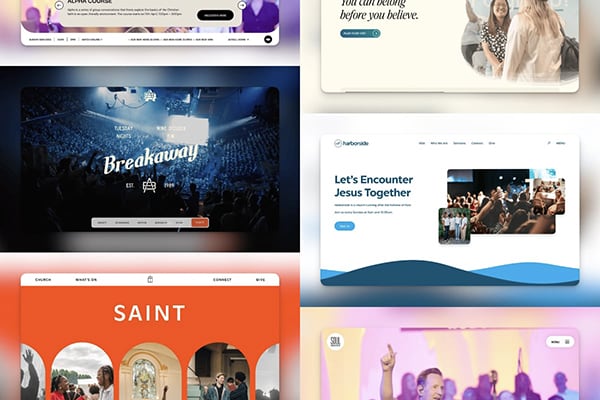
Need some inspiration for mobile-friendly church websites? We've got you:
3. Create helpful content
Google wants to show people content that actually helps them. Churches have a real advantage here: blog posts, devotionals, equipping resources and sermons are exactly the kind of content people search for.
That's why we love building sermon libraries right into church websites, either as a native Webflow library or with sermon embeds from platforms like Subsplash. Every sermon becomes another page people can find.
Here are a couple of sermon library examples:

4. Cover the technical basics
A few technical pieces every church website should have:
- XML sitemap: create one and submit it to Google Search Console so Google can find all your pages. Webflow generates this for you.
- Robots.txt: make sure it lets search engines crawl your important pages.
- Structured data: use schema markup, like the Church type, to help search engines understand who you are, where you are and when you meet.
5. Use Google Analytics and Search Console
Google offers free tools to track your website traffic, search rankings and how people use your site. Search Console also shows you what people search to find you, and flags broken pages and other issues.
Set up both. This isn't something to obsess over, but it's worth checking once a month or once a quarter. The results will also show you which sermons and content people are drawn to, which can shape what your church publishes next.
Set up your Google Analytics account here.
Learn more about Search Console.
What about AI search?
More people are now asking ChatGPT, Google's AI Overviews and other AI tools questions like "what's a good church near me?" The good news is that the same things that help your SEO help here too: clear content, a complete Google Business Profile, good reviews and structured data. AI tools do reward a few extra things, like content written as clear answers to real questions. We cover that in our post on AEO for churches.
One final note
We don't think most churches need to pour a ton of money into SEO. Follow the best practices above and you should see good results over time.
SEO also brings a unique opportunity for churches. More and more people are taking their questions about faith online before they ever ask a person.
What websites will pop up when skeptics and Christians alike take their questions about faith to Google? With SEO, churches have an opportunity to be not only a physical place for community, but also a digital voice for people who are exploring their faith.
Consider this your encouragement to start creating content that helps people in their walk with Jesus. Optimize it so people can find it. Then invite them to connect in person on Sundays and in your ministries, so they can keep growing in their faith alongside other people.
Bring more visitors to church on Sundays
Here's the deal. You might have a great church, but your website isn't convincing people to visit. Maybe it's bland, hard to navigate, or just not built to be found.
We've been there, and we're here to help. We have a proven process for turning church websites into the number one tool for inviting people into your community. Your new website will look great, work beautifully on every device, and be set up for SEO from day one.
Related Resources

Can AI Build Your Church Website? Why You Still Need an Expert
AEO for Churches: How to Get Found in the Age of AI Search

How to Make the Case for a New Church Website to Your Leadership

How to Choose a Church Website Agency

Local SEO for Churches: How to Show Up When People Search
Church App vs Church Website: Do You Need Both?

Church Website Accessibility: A Practical Guide for Welcoming Everyone Online
How Much Does a Church Website Cost? A Transparent Pricing Guide

WordPress vs Webflow: Why We Build Every Church Website on Webflow

Is Webflow Secure? Why Churches Can Trust Webflow for Their Website

The Ultimate Church Photography Guide
Your Church Website is the New Front Door

5 Advanced Webflow Features Large Churches Can Leverage

Visiting a Church for the First Time is hard

5 Things Every Church Website Should Include
Multi-Campus Church Websites
The Most Important Page on your Church Website
How to Edit Your Church Website in Webflow
Best Church Website Builders in 2025: A Complete Guide
SEO: A Guide for Churches

How to Write Great Website Copy

Custom vs. Template Church Websites
What is Webflow? The Best Platform for Church Websites
The Best Church Websites of 2024

Who is Your Church Website For?


Are you ready?
